DOWNTOWN BROOKLYN, NEW YORK
Private Recording
Studio.
Your space.
Your sound.
01 THE STUDIO
A room of
your own.
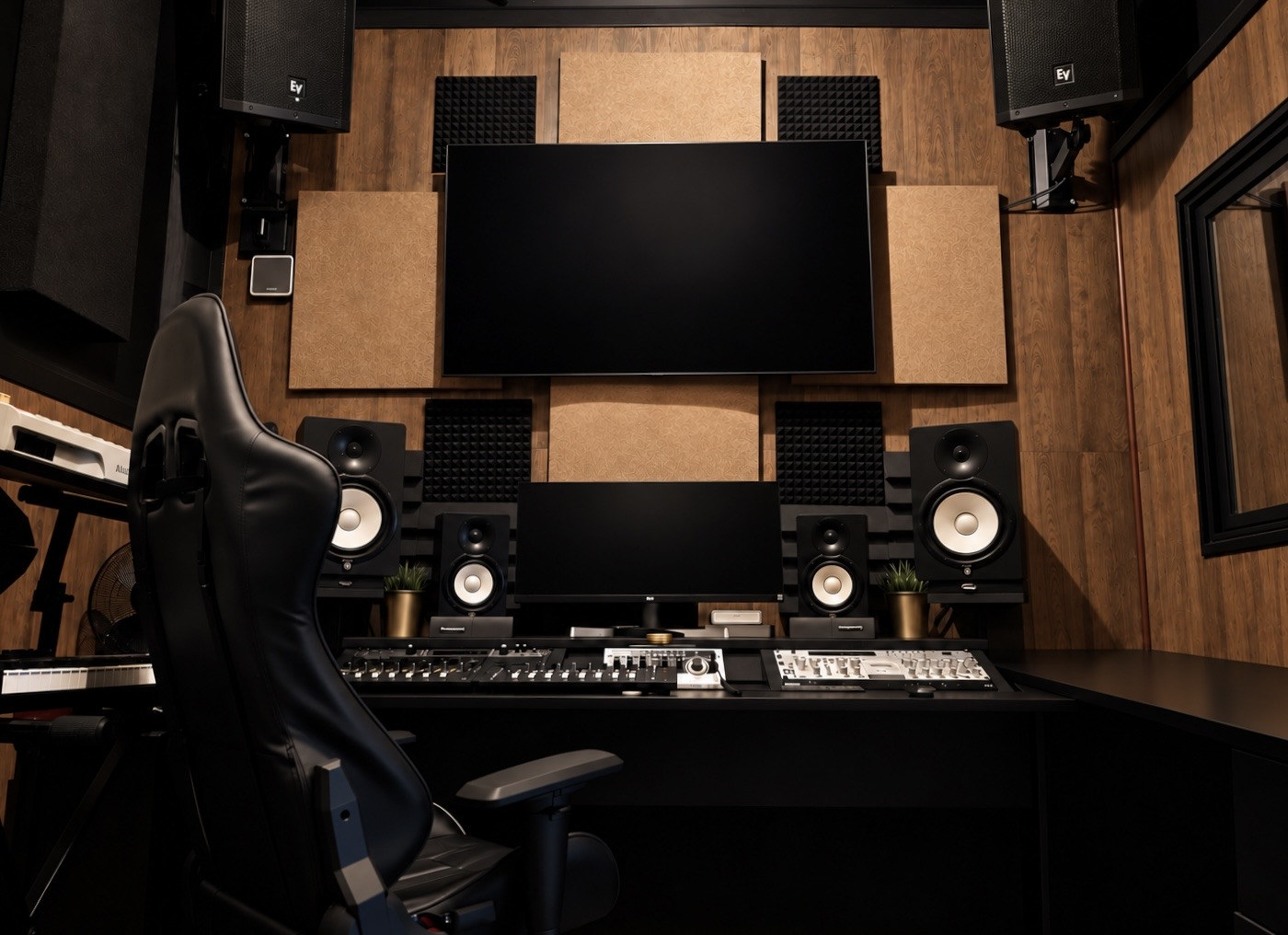
A private workstation. A dedicated vocal booth. Space to settle in and create. Remotely hosted, with secure self-access for confirmed bookings.
- 168 SQ FT
- Your private studio
- 5 GUESTS
- Maximum occupancy
- 24/7 ACCESS
- With a confirmed booking
THE LITTLE THINGS, CONSIDERED
Settle in. Stay in your flow.
Explore what’s included in your studio time.
Secure self-accessYour booking. Your unique PIN.
Black Box is remotely hosted. A unique access PIN is provided for each confirmed booking, so you can let yourself in. Studio access is available 24/7 for confirmed bookings.
Connected & supportedHigh-speed Wi-Fi. Remote assistance.
High-speed Wi-Fi and remote technical support are available. For access or technical assistance, use the Black Box contact information provided with your reservation.
Comfort in the roomCentral air. A little breathing room.
Central air conditioning and an in-studio air purifier help keep the room comfortable. The vocal booth has ventilation with continuous airflow.
Between takesSeating & everyday essentials.
A guest seating area, refrigerator/water cooler, and microwave are available. Restrooms are on the same floor. Keep food and drinks away from equipment and outside the vocal booth, and remove everything you bring before leaving.
Inside the boothYour workstation, in view.
The booth display mirrors the main workstation. Wireless keyboard and mouse control is available only to solo guests who are both the artist and a qualified engineer, proficient in operating the workstation and recording software independently.
Getting hereDowntown Brooklyn connections.
Multiple subway and bus lines are nearby, with street parking in the surrounding area. Wheelchair access is available 9:30 AM–5:30 PM, except holidays.
Video only. No audio recorded. Cameras operate in the main studio and vocal booth for security and remote support.
02 THE SOUND
PROFESSIONAL VOCAL CHAIN
Every detail.
Every take.
A considered vocal chain, from the microphone in the booth to the heart of the workstation.
- 01MICROPHONE
Neumann U87 Ai
- 02CHANNEL STRIP
Avalon VT-737SP
- 03AUDIO INTERFACE
Universal Audio Apollo x6
SOFTWARE & EQUIPMENT
Work in
your element.
Familiar software. Hands-on control. A workstation ready for your process.
- Pro Tools Studio01
- Logic Pro02
- Avid Artist Series
Dual Artist Mix + Artist Control03
Antares Auto-Tune · UAD · FabFilter · Waves
Soundtoys · SSL · Valhalla
Explore equipment & plug-ins
A closer look at the tools inside Black Box, from the vocal chain to the workstation and booth.
Vocal chain
- Neumann U87 Ai
- Avalon VT-737SP
- Universal Audio Apollo x6
Monitoring
- Yamaha HS8 studio monitors — pair
- Yamaha HS5 studio monitors — pair
- EV speakers — pair
- SPL MTC 2381 monitor controller with talkback
Workstation & control
- Apple Mac mini
- LG extended display
- LG wall TV / studio display
- USB-C hub
- Furman main power unit
- Dual Avid Artist Mix + Artist Control
- Wired keyboard and mouse
Instruments & headphones
- Akai MPC 2000
- M-Audio 61-key MIDI controller
- Universal Audio headphones
- Beats headphones
Software & plug-ins
- Pro Tools Studio
- Logic Pro
- Selected plug-ins from Antares Auto-Tune, UAD, FabFilter, Waves, Soundtoys, SSL, and Valhalla
Named vocal plug-ins
- Auto-Tune Pro
- Auto-Tune Artist
- Auto-Tune EFX 2
- Auto-Tune Vocal Compressor
- Auto-Tune Vocal EQ
- AVOX Choir
- AVOX Duo
- AVOX Punch
- AVOX Sybil
These vocal plug-ins are available directly in Logic Pro and through saved Blue Cat PatchWork presets in Pro Tools Studio.
Vocal booth
- Insignia display with a mirrored workstation view
- Wireless keyboard and mouse for solo guests who are both the artist and a qualified engineer, proficient in operating the workstation independently
- Ventilation with continuous airflow
- Approximately 4.6 × 4.5 feet, with a 7-foot ceiling
03 YOUR SESSION
Make time
for your music.
Remotely hosted. Secure self-access. Bring your ideas and make the space your own.
Read guest essentialsLIMITED INTRODUCTORY RATE
$25/ hour
Two-hour minimum
Regular rate: $50/hour · Two-hour minimum
Let yourself in.
A unique access PIN is provided for each confirmed booking. Black Box is remotely hosted.
Bring your expertise.
Engineer not included. Bring your qualified engineer, or self-record if qualified. In-booth wireless control is for solo engineer/artists only.
Take your session home.
Bring an external hard drive or SSD. Save and verify your complete session before leaving. No long-term session storage is provided.
Your reserved time includes setup and breakdown. Maximum 5 registered guests.
04 GUEST ESSENTIALS
A LITTLE PREPARATION. MORE CREATIVE TIME.
Arrive ready.
Make it yours.
A remotely hosted studio, with clear expectations for a smooth session. Take a moment to get oriented before you book.
- Bring your qualified engineer, or self-record if qualified.
- Bring an external hard drive or SSD.
- Keep your group to 5 registered guests.
Access or technical assistance?
Use the contact details in your reservation.
01 / ARRIVALBooking & self-access
Black Box is remotely hosted. Confirmed bookings receive a unique access PIN for secure keyless entry. Studio access is available 24/7 for confirmed bookings.
- Maximum 5 guests. Only registered guests are permitted.
- Your booking includes setup and breakdown. Leave the studio by the end of your reserved time.
- Keep the studio door fully closed and locked while inside. Never prop it open.
- Wheelchair access is available 9:30 AM–5:30 PM, except holidays.
Use the booking contact information provided with your reservation for access or technical assistance.
02 / PREPARATIONYour engineer & your files
Engineer not included. Bring your own qualified engineer. Qualified guests may self-record. In-booth wireless control is only for solo guests who are both the artist and a qualified engineer and can operate the workstation and recording software independently.
Bring your own external hard drive or SSD. Create, save, and run your session from that drive whenever practical. Before your booking ends, save or transfer the complete session, audio files, stems, bounces, and any other required files to your drive.
Verify that the complete session opens from your drive and all required files are present. Black Box does not provide long-term guest session storage. Workstation files are temporary, may be removed after the booking, and are not Black Box’s responsibility.
03 / IN THE STUDIOHouse rules & recording privacy
- No parties or unauthorized gatherings.
- Keep hallways and common areas quiet and unobstructed. Guests must remain in the studio or exit the building; no hallway loitering.
- Keep food and drinks outside the vocal booth and away from equipment.
- Do not move, disconnect, or reconfigure studio equipment. Do not move the microphone stand or reposition the microphone on it; only vertical height adjustments are permitted.
- Cigarette and hookah smoking is not allowed. Absolutely no smoking in the vocal booth.
24/7 video surveillance is in use in the main studio and vocal booth for security and remote support. No audio is recorded. Do not cover, block, move, disconnect, or adjust cameras.
04 / DEPARTUREBefore you leave
- Save and verify the complete session on your external drive.
- Follow the engineer workstation guide to return the controls to their default state and shut down the workstation.
- Return the studio to the condition in which you received it.
- Remove all trash and personal items. Leave no food, drinks, bottles, or other items in the refrigerator/cooler, microwave, or elsewhere in the studio.
- Reline the studio trash can with a fresh plastic bag. Spare bags are stored underneath.
- Leave by the end of your reserved time. Pull the studio door completely closed, confirm it has latched, and lock it. Do not leave until it is secure.
Black Box is not responsible for personal items left behind. Cleanup and other booking charges are described below.
05 / BOOKING TERMSDeposits, damage & extra time
The limited introductory rate is $25/hour. The regular rate is $50/hour. Both have a two-hour minimum.
- Giggster reservations
- $100 security deposit through the platform.
- Peerspace reservations
- No separate security deposit. Damage and overages are handled through Peerspace’s process.
Guests are responsible for damage to the studio, furnishings, and equipment during their reservation. Additional charges may apply for damage, excessive cleaning, unauthorized guests, or time beyond the confirmed reservation.
Trash left behind will result in an additional charge and a future hourly-rate increase, and may result in loss of future booking privileges.
Review the terms attached to your reservation when booking.
05 FIND US
NEW YORK, NEW YORK
Rooted in
Brooklyn.
Downtown Brooklyn
2 Prince StreetBrooklyn, NY 11201
9:30 AM–5:30 PM, except holidays.
Nearby subway and bus connections.
Street parking in the surrounding area.
BLACK BOX · PRIVATE RECORDING STUDIO